How odio works
odio is not an appliance. Flash the image or run the installer and you get a working system in minutes, but it is still plain Raspberry Pi OS / Debian, not a black box. odios assembles a set of components, each doing one thing well, and every one of them is a standalone project you can use on its own.
The whole stack runs in your user session. The system footprint is short enough to list: the odio apt repository, packages, /etc/bluetooth/main.conf, user units and config files, one udev rule, two polkit rules, and a sudoers fragment that only allows upgrades and Audio HAT selection. Flashed images also get unattended-upgrades, extended to the Raspberry Pi archive (kernel, firmware).
The stack is not a matter of taste.
MPD for local playback. Shairport Sync for AirPlay. Snapcast for synchronized multi-room audio. upmpdcli for UPnP/DLNA, Qobuz, and Tidal Connect. BlueZ for Bluetooth A2DP. PulseAudio to route the audio. These are the reference implementations the open-source audio community has converged on over the years.
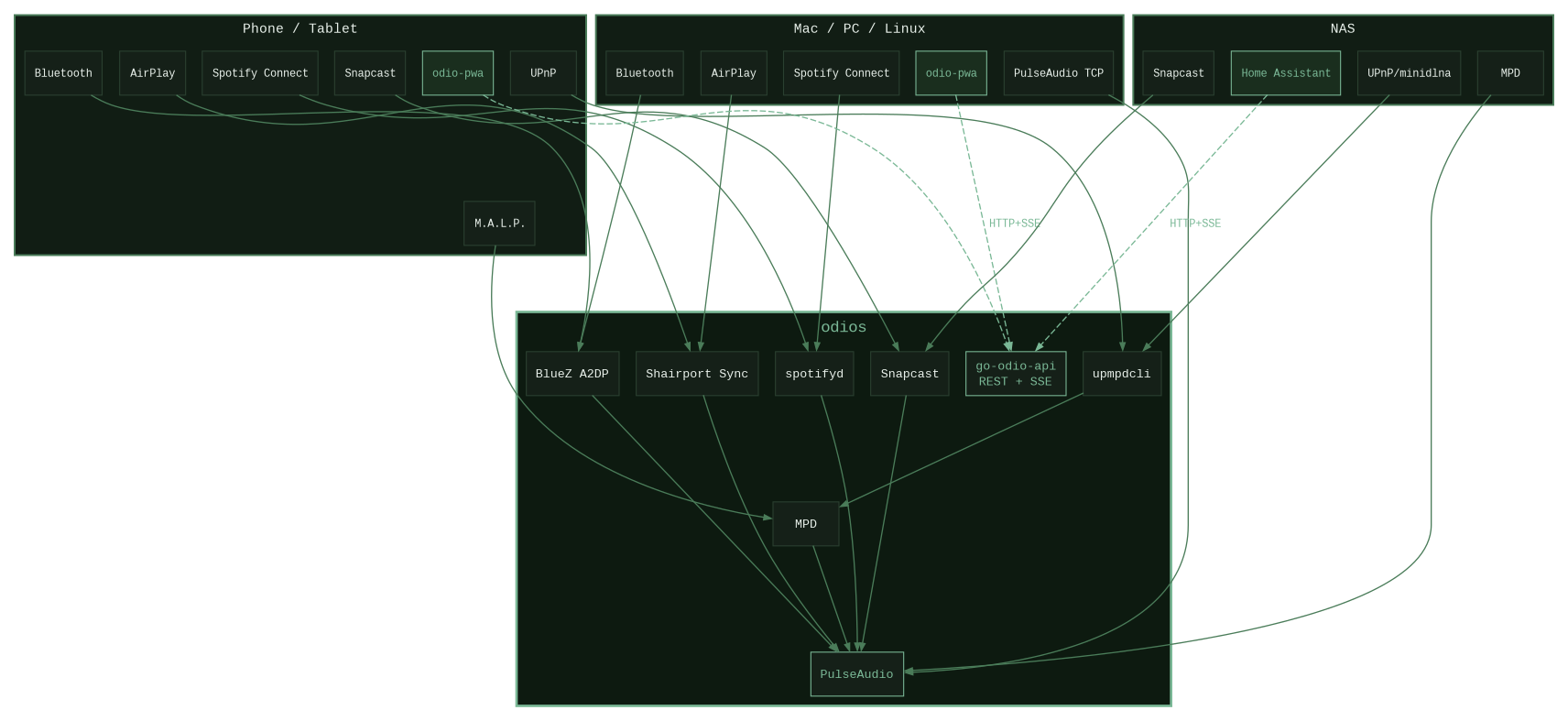
PipeWire is available as an experimental backend, picked at install time. PulseAudio stays the default: its TCP sink has been in production here for six years.
odio uses MPD mainly for CDs, USB drives and DLNA, not for library management, which doesn’t hold up on a Pi B+ with a large database. Its UPnP renderer and network audio support stream straight from your NAS without indexing anything locally. You can still mount your library over NFS in /media/USB/<nfs>.
One decision shapes everything.
odio runs in your systemd user session, not as root. go-odio-api refuses to run as root.
User sessions have been the recommended model since systemd 200, over a decade ago, yet most audio appliances stayed on the system model with ALSA: one process owns the audio device, and every source change means a crackle. With PulseAudio in the user session, MPD, Shairport Sync and Snapcast share the same mixer at once. There is no source to select: whatever plays is heard.
The user session also gives odio legitimate access to the multimedia stack: the D-Bus session bus, PulseAudio, MPRIS, logind, BlueZ user-level profiles. No privilege escalation, no setuid: the plain UNIX permission model.
MPRIS is the freedesktop standard through which Linux media apps (MPD, mpv, Firefox, Spotify, VLC) publish their state and transport controls on the session bus. Neither the UI nor go-odio-api talks to a player directly: they go through MPRIS. Start a new player and it shows up in the API and the UI as soon as it plays.
go-odio-api
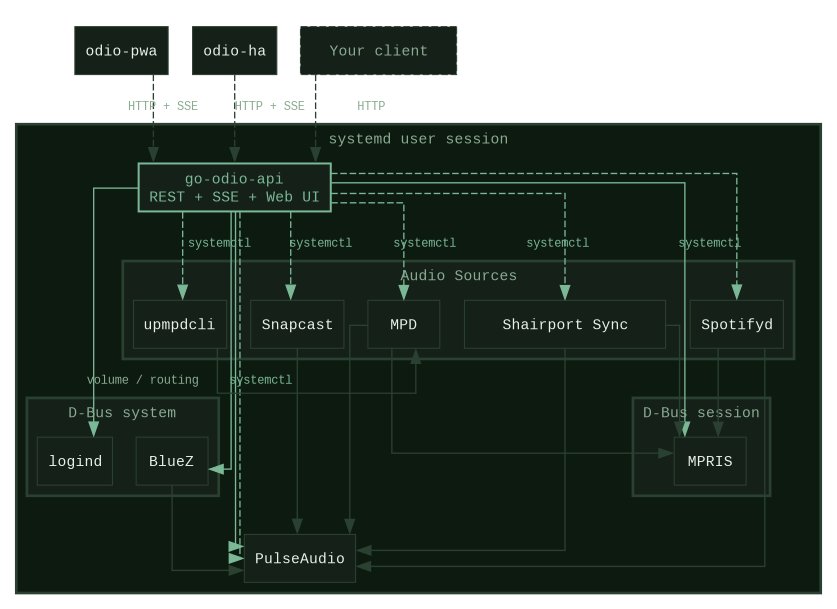
go-odio-api is a REST API written in Go that makes the stack programmable. Playback, volume, sources, Bluetooth pairing, power, output routing and every systemd user unit managed by odios are exposed over HTTP, with SSE for real-time updates. Each node can be driven from a browser, a phone, a script or a Home Assistant automation.
It is event-driven: it listens to D-Bus signals, MPRIS events and PulseAudio state changes and keeps a cache, instead of polling. On a Pi B+, idle cost stays near zero.
It sits in the same space as KDE Connect, with other trade-offs: KDE Connect assumes a desktop and a paired client, go-odio-api only a network and a user session. It runs headless and does less, on purpose. That is also why it runs beyond the Pi: an HTPC on Debian, a NAS on OpenMediaVault, a workstation on Fedora. It exposes only what you enable.
The binary embeds a web UI, served by the same process. It is one client among others: the API is the product.
Settings: the gear in the UI header opens the node’s settings page, served by odioctl behind go-odio-api’s reverse proxy. Upgrade the whole stack, choose which components run, pick your Audio HAT, sign in to Qobuz or Tidal. Turning a component off undoes its changes and keeps its config. Everything on the page is also an odioctl command; what goes where is discussed in the discussions.
Local screen: the optional odio-kiosk shows the UI full screen on /dev/fb0 through Qt 6 WebEngine, without a desktop session. Off by default, arm64 and x86-64 only: Raspberry Pi OS armhf ships no QtWebEngine.
Remote controls: a TV remote over HDMI-CEC, an infrared receiver, GPIO buttons, a Bluetooth or USB remote. Their keys go to the active player through MPRIS, and only to odio.
odio-ha
odio-ha is a native Home Assistant integration, installable via HACS.

Nodes are discovered via Zeroconf and each appears as one HA device, updated in real time over SSE.
Playback: a main media player for the audio backend (PulseAudio or pipewire-pulse) with volume, mute and output selection. Each MPRIS player and remote audio client becomes a child media player with transport controls, metadata and live position.
Bluetooth: power, pairing mode and connected device as native entities. Try finding a Bluetooth speaker you can turn on from a Home Assistant automation.
System: systemd user services as switches, reboot and power-off buttons, all whitelist-based. System units are read-only.
Updates: the odio stack upgrade as a native HA update entity.
odio-ha doesn’t replace the existing MPD, spotifyd, upmpdcli or Snapcast integrations: any entity it manages can be mapped to an existing HA media player, so HA treats them as one.
What’s still missing is a dashboard that does it justice. If you build HA dashboards, odio’s waiting for you.
The ecosystem
Sixteen repositories. One coherent stack.
The foundation is six years old.
In 2020, during the first lockdown, I documented the whole stack in a Medium series: apt install, systemd services, bash scripts, udev rules, one feature at a time. It went into production. Four major Debian upgrades later, the same Pi B+ in the same wooden case had never been reinstalled. Total hardware cost: €164.
go-mpd-discplayer came from a gap in that setup: CDs played, but MPD clients showed no track metadata. The 2020 article said so: “What annoys me more is that I don’t have tracks tags.” go-disc-cuer fixes it with GnuDB, MusicBrainz and a CUE sheet fed to MPD.
go-odio-api started in January 2026, as a way to test Claude Code. The POC worked well enough to keep going. Home Assistant integration came next, since it was the goal from the start, then the PWA because the UI was inconvenient to reach, then the installer, to wrap up what I started in 2020 as a first complete use case of the API.
The CI grew with it: unit tests, builds for every target (binaries, Docker images, apt and rpm packages), and an apt repository managed entirely by CI. A tagged release builds the package, the package lands in the repo, apt sees it.
The installer is a vendored Ansible archive run with a curl one-liner. Ansible because it is idempotent, vendored because resolving dependencies at install time is a failure waiting to happen. The flash image comes from the same playbook, frozen at release time, so a fresh install and an upgrade end up in the same state.
That’s the chain I believe in: bash scripts became binaries, then packages, a repo, an installer, an image, without rebuilding anything from scratch, and new features still land without breaking old ones.
About AI usage
I widely used AI, and specifically Claude Code to build odio. It’s a very controversial topic, especially in the open source world, so let me share my experience with the same open approach as for the rest of the project.
About this site: are those my words? In this specific part, yes. Otherwise, not entirely, not really. But did I review them thoroughly, to make sure they matched my ideas? Definitely.
I’m an R&D Engineer, a lazy but demanding one. If there’s a tool that makes my work easier, I’ll give it a try. I tried AI late 2024 with go-mpd-discplayer, and wasn’t convinced at all. It helped a bit, but the AI sycophancy and hallucinations wasted a lot of my time.
But Claude Code really changed the game. It doesn’t know how to make good software, I do, at least I hope. It’s a really good Code Monkey, I’m definitely not. It has a lot of knowledge I don’t have, and I had a product vision, or at least I built one in the process.
Thanks to Claude Code I could focus on what really matters: user experience, requirements, architecture and maintainability. Adding good debug logs, regression tests, CI, packaging, documentation, basically everything that makes good software in the long run is ultra easy with Claude Code.
I’ve always preferred to work in small iterations, coming from the DevOps world, I find it’s my most effective process. Thanks to Claude Code those iterations got ultra fast. What I find amazing now is that it has completely adapted to my style of coding. The more the project grows with a strong “code identity”, the fewer corrections I need.
How do I process with AI?
I start by digging into the feature with Claude as I would with a team in a brainstorming process, especially to test edge cases and challenge architectural choices. From there we write a specification for Claude Code to write. It writes, usually in manual approve mode. I test. We fix (or not). I review then we refactor with SOLID, DRY and KISS patterns as a preoccupation. Then add tests and doc, and most of the time my two cents before merging in main. I try to commit and rebase as much as possible.
I’ve also experienced vibe coding. It mostly ended up with closed Pull Requests, and me restarting with brand new requirements, a few cherry-picked commits when lucky. Every session Claude lead was a wasted one. Mastering AI and your subject is not an option when you chose to use it.
So yes maybe Claude Code wrote most of odio stack, but I’m its architect, and the one accountable for it. Make of that what you will.
No AI was harmed during odio development. Probably.